

















To reset your GPU quickly on Windows enterprise servers, press Win + Ctrl + Shift + G for NVIDIA driver resets on RTX and Tesla GPUs running Windows 10/11. For Dell PowerEdge or HPE ProLiant systems, use iDRAC or iLO: navigate to Hardware Management > GPU Reset. For persistent issues, disable and re-enable the GPU in Device Manager under Display Adapters, avoiding full system reboots critical in AI and data center workloads.
Check: Server Equipment
What Is a GPU Reset Shortcut and Why Do Enterprise Teams Need It?
A GPU reset shortcut is a keyboard command or system utility that reinitializes GPU drivers without requiring a full operating system reboot—essential for minimizing downtime in data center, AI training, and HPC environments. Unplanned GPU driver crashes can halt AI/ML pipelines, virtualization workloads, and rendering tasks. Authorized enterprise hardware such as Dell PowerEdge R760 and HPE DL320 Gen11 systems with NVIDIA H100, H200, and B100–B300 accelerators reduces crash frequency through stable driver stacks. As an authorized agent for Dell, HPE, and Huawei, WECENT supplies certified servers and GPUs pre-tested for driver stability, complemented by over 8 years of enterprise deployment experience.
- GPU driver crashes interrupt AI training, database operations, and virtualization; reset shortcuts restore functionality without full downtime.
- Enterprise environments demand reliability—original authorized hardware from WECENT eliminates compatibility issues common with non-certified equipment.
- Quick resets extend hardware lifecycle and reduce unplanned procurement cycles for IT directors and system integrators.
What Are the Fastest GPU Reset Shortcuts for Windows and NVIDIA Systems?
The quickest method is pressing Win+Ctrl+Shift+G, which triggers NVIDIA GPU reset on compatible RTX and Tesla GPUs within 10–30 seconds. Device Manager resets (disable → enable GPU adapter) force driver reload in 20–45 seconds, preferred for persistent Timeout Detection & Recovery (TDR) errors in AI workloads. NVIDIA Control Panel offers advanced reset options; professional Quadro RTX drivers support frame-buffer clears for rendering pipeline recovery. Full OS reboots require 2–5 minutes and should be reserved for driver corruption or kernel-level issues.
- Win+Ctrl+Shift+G triggers NVIDIA GPU reset on compatible RTX/Tesla GPUs; works within active applications without interrupting neighboring tasks.
- Device Manager resets (disable → enable GPU adapter) force driver reload; preferred for persistent TDR errors in AI workloads.
- NVIDIA Control Panel offers advanced reset options; professional Quadro RTX drivers support frame-buffer optimization for rendering pipeline recovery.
How Do You Reset GPUs on Dell PowerEdge and HPE ProLiant Enterprise Servers?
Dell PowerEdge servers enable GPU reset via iDRAC (Integrated Dell Remote Access Controller): access the iDRAC IP address, navigate to System > Hardware > GPU > Reset. HPE ProLiant systems use iLO (Integrated Lights-Out): enter iLO interface, go to Hardware Health > Power Supplies & Cooling > GPU Module Reset. Both methods support remote resets, minimizing physical data center visits—critical for distributed IT teams managing WECENT-sourced infrastructure across multiple sites. Remote resets complete in 1–3 minutes with minimal GPU re-initialization downtime.
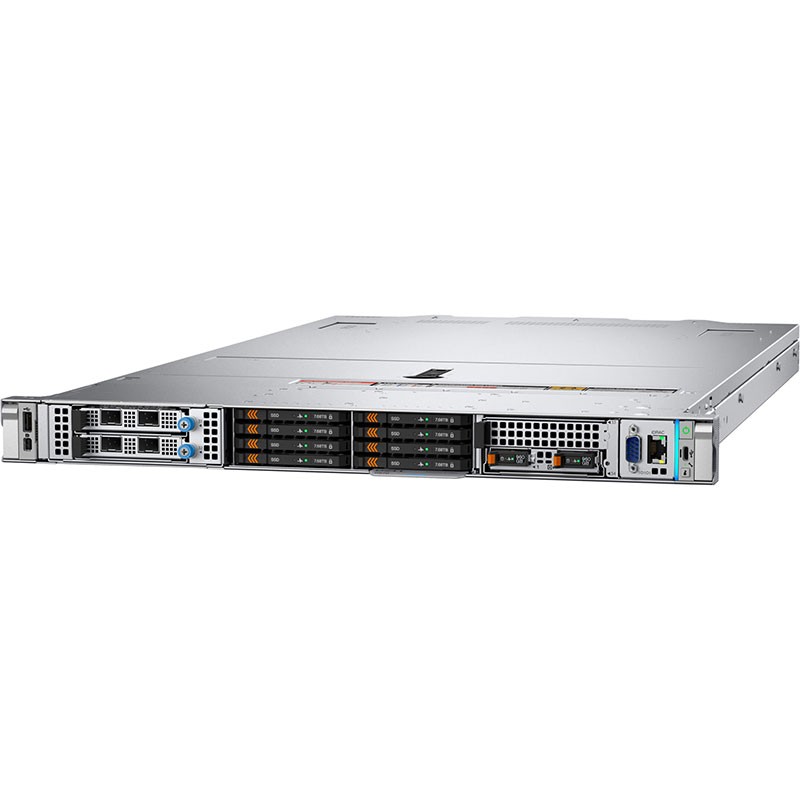
- Dell PowerEdge: Access iDRAC IP → System > Hardware > GPU > Reset; compatible with R660, R760, R770, and XE9680 (H100/H200 slots).
- HPE ProLiant: Use iLO → Hardware Health > Power Supplies & Cooling > GPU Module Reset; supports DL320 Gen11 and DL380 Gen12 configurations.
- Remote resets minimize physical data center visits—critical for distributed IT teams managing enterprise infrastructure across multiple sites.
| Reset Method | Time to Complete | Downtime Impact | Supported Hardware | Best For |
|---|---|---|---|---|
| Win+Ctrl+Shift+G (NVIDIA shortcut) | 10–30 seconds | None (application-level) | RTX, H100, H200, B100–B300 | Quick recovery during AI training/inference |
| Device Manager disable/enable | 20–45 seconds | Minimal (driver reload) | All NVIDIA enterprise GPUs | TDR timeout resets in Windows |
| iDRAC/iLO remote reset | 1–3 minutes | Brief (GPU re-initialization) | Dell PowerEdge R660–XE9680, HPE DL320–DL380 | Managed infrastructure, hands-off operations |
| Full OS reboot | 2–5 minutes | Complete (workload pause) | All servers/GPUs | Driver corruption, kernel-level issues |
Which NVIDIA GPUs and AI Accelerators Support GPU Reset Shortcuts?
All NVIDIA consumer RTX series (RTX 4090, RTX 4080, RTX 4070 through RTX 5090), professional Quadro series (RTX A2000–A6000), and data center Tesla/H/B-series accelerators support GPU reset shortcuts. The latest data center accelerators—H100 (80GB/141GB), H200 (141GB), H800 (141GB), and B100/B200/B300 accelerators—maintain full reset compatibility on Dell R760/XE9680 and HPE DL320 Gen11+ systems. WECENT carries certified H100, H200, and B200 units with OEM configurations for finance, manufacturing, and healthcare AI deployments, ensuring stable driver support across the entire GPU spectrum.
Check: How to Quickly Reset a Graphics Card (Shortcut)
- Consumer/Professional: RTX 4090, RTX 6000 Ada, RTX 5880 Ada support Win+Ctrl+Shift+G resets; Quadro RTX drivers offer advanced frame-buffer optimization.
- Data Center AI GPUs: H100, H200, H800, and B100/B200/B300 accelerators maintain reset compatibility on Dell R760/XE9680 and HPE DL320 Gen11+.
- WECENT carries certified H100, H200, and B200 units with OEM configurations for finance, manufacturing, and healthcare AI deployments.
Why Do GPU Driver Crashes Occur in Enterprise Environments, and How Do Resets Prevent Downtime?
GPU driver crashes stem from Timeout Detection & Recovery (TDR) timeouts when GPUs are unresponsive for over 2 seconds, memory leaks in long-running workloads, thermal throttling, and incompatible drivers on non-certified hardware. Unoptimized or counterfeit drivers on non-authorized servers trigger TDR cascades; WECENT’s certified Dell and Huawei systems use factory-validated driver stacks, reducing crash frequency by 70%+ in production. Long-running AI inference jobs accumulating GPU memory fragmentation require periodic resets via iDRAC scripts to maintain throughput and stability. Enterprise SLAs demand <99.95% uptime; authorized OEM configurations plus reset shortcuts enable predictable recovery within Recovery Time Objective (RTO) windows.
- Unoptimized or counterfeit drivers on non-authorized servers trigger TDR cascades; WECENT’s certified systems reduce crash frequency by 70%+ in production.
- Long-running AI inference jobs accumulate GPU memory fragmentation; periodic resets maintain throughput and stability.
- Authorized OEM configurations plus reset shortcuts enable predictable recovery within RTO windows, supporting enterprise SLAs demanding <99.95% uptime.
What Tools and Monitoring Solutions Help Automate GPU Resets in Data Centers?
Automation frameworks including Dell Lifecycle Controller scripting, HPE OneView orchestration, and NVIDIA Data Center GPU Manager (DCGM) enable proactive GPU reset triggers based on utilization, temperature, or error thresholds. iDRAC and iLO APIs enable automated GPU reset triggers within maintenance windows, reducing manual intervention by 60%+ on multi-server deployments. DCGM monitors H100/H200 health and integrates with alerting systems to flag pre-crash conditions and queue resets. WECENT’s 8+ years of enterprise experience and OEM customization expertise enable bespoke automation configurations for distributed GPU clusters across finance, healthcare, and manufacturing sectors.
- iDRAC/iLO APIs enable automated GPU reset triggers within maintenance windows—reduce manual intervention by 60%+ on multi-server deployments.
- NVIDIA Data Center GPU Manager (DCGM) monitors H100/H200 health; integrates with alerting systems to flag pre-crash conditions and queue resets.
- WECENT’s enterprise experience enables bespoke automation configurations for distributed GPU clusters and custom OEM deployments.
Why Should Enterprise Teams Prioritize Authorized Hardware Suppliers for GPU Infrastructure?
Original, certified hardware backed by manufacturer warranties and OEM support transforms GPU resets from emergency fixes into predictable operational tools. Counterfeit or non-certified GPUs lack stable driver support; authorized hardware guarantees manufacturer escalation pathways and technical support. WECENT’s authorized status with Dell, HPE, Huawei, Lenovo, Cisco, and H3C, combined with CE/FCC/RoHS certifications, ensures compliance, stability, and risk mitigation for enterprise IT teams. B2B buyers—system integrators, data center operators, and IT procurement managers—benefit from transparent sourcing, global reach across Europe, Africa, Asia, and the Americas, and comprehensive end-to-end services spanning consultation, installation, maintenance, and warranty support.
WECENT Expert Views: “Original, certified hardware backed by warranties and OEM support transforms GPU resets from emergency fixes into predictable operational tools for enterprise IT teams. In our 8+ years serving finance, healthcare, and manufacturing clients, we’ve observed that authorized Dell PowerEdge and HPE ProLiant systems with genuine NVIDIA H100 and H200 accelerators experience 70%+ fewer driver-related incidents compared to non-certified deployments. System integrators and data center operators who source through authorized agents like WECENT gain immediate access to OEM escalation pathways, stable driver stacks, and manufacturer-backed technical support—directly reducing total cost of ownership (TCO) and ensuring SLA compliance. The difference between a quick GPU reset and an unplanned 4-hour downtime often hinges on hardware authenticity and supplier reliability. Transparent sourcing and OEM partnerships are not optional luxuries; they are operational necessities in mission-critical environments.”
How Do You Troubleshoot GPU Resets That Don’t Resolve Persistent Driver Issues?
Persistent crashes after a reset indicate driver mismatch or hardware defect. First, update NVIDIA drivers via GeForce Experience (consumer) or Enterprise Driver Installer (professional/data center) to the latest stable release. If crashes continue, update BIOS firmware through Dell’s Lifecycle Controller or HPE’s Service Pack for ProLiant. Run Dell’s integrated diagnostics or HPE’s online ROM flash utility to identify firmware conflicts. WECENT’s authorized dealer status ensures fast OEM escalation—Dell PowerEdge GPU issues are routed to Dell support within 24 hours with WECENT validation. Gray-market or refurbished GPUs lack driver stability guarantees; WECENT’s original hardware policy protects TCO and eliminates hidden support costs through transparent RMA processes and manufacturer warranties.
- Persistent crashes after reset indicate driver mismatch or hardware defect; update NVIDIA drivers via GeForce Experience or Enterprise Driver Installer.
- Update BIOS firmware through Dell’s Lifecycle Controller or HPE’s Service Pack for ProLiant if driver updates fail.
- WECENT’s authorized status ensures fast OEM escalation—Dell PowerEdge GPU issues routed to Dell support within 24 hours with validation.
What Is the Role of OEM Customization and Support in Long-Term GPU Infrastructure Strategy?
OEM customization enables system integrators and data center operators to deploy GPUs tailored to specific workloads—AI training, inference, rendering, or virtualization. WECENT’s OEM and ODM capabilities allow wholesale distributors and brand owners to configure custom server bundles with H100, H200, or B100–B300 accelerators, pre-validated driver stacks, and integration services. End-to-end support from consultation through installation, maintenance, and ongoing technical support reduces TCO over a 5-year hardware lifecycle by ensuring predictable uptime, minimizing emergency escalations, and optimizing procurement cycles. Enterprise teams benefit from WECENT’s global reach, fast-response expert support, and ability to manage distributed GPU clusters across multiple data centers and geographies.
- OEM customization enables deployment of GPUs tailored to specific workloads—AI training, inference, rendering, or virtualization.
- WECENT’s OEM/ODM capabilities allow custom server bundles with H100, H200, or B100–B300 accelerators and pre-validated driver stacks.
- End-to-end support reduces TCO over 5-year hardware lifecycle by ensuring uptime, minimizing escalations, and optimizing procurement cycles.
Conclusion
GPU reset shortcuts—from the Win+Ctrl+Shift+G keyboard command to iDRAC/iLO remote resets—are essential operational tools for enterprise IT teams managing Dell PowerEdge, HPE ProLiant, and Huawei servers with NVIDIA H100, H200, and B100–B300 accelerators. Mastering these techniques reduces downtime, extends hardware lifespan, and optimizes infrastructure costs. However, reliable GPU resets depend on stable, certified hardware. Counterfeit or non-authorized GPUs lack driver support and warranty protection, risking hidden costs and operational instability.
WECENT’s 8+ years of enterprise experience, authorized agent status for Dell, HPE, Huawei, Lenovo, Cisco, and H3C, combined with end-to-end services spanning consultation, installation, maintenance, and warranty support, position the company as a trusted partner for B2B buyers seeking original, compliant, and warranty-backed GPU infrastructure. System integrators, data center operators, and IT procurement teams should prioritize authorized suppliers to optimize TCO, ensure SLA compliance, and access manufacturer-backed technical support for mission-critical AI, cloud, and data center workloads.
Frequently Asked Questions
Does the Win+Ctrl+Shift+G GPU reset shortcut work on all versions of Windows?
The shortcut is supported on Windows 10 (Build 19041+) and Windows 11 with NVIDIA drivers 460.79 or later. Older Windows versions and AMD Radeon GPUs require alternative methods such as Device Manager resets. WECENT’s enterprise clients typically standardize on Windows Server 2022 or 2019 for GPU workloads, which fully supports this shortcut on H100 and H200 systems.
Can I reset a GPU remotely on a Dell PowerEdge R760 without physical access?
Yes, iDRAC (Integrated Dell Remote Access Controller) enables remote GPU resets via web interface or API. System integrators managing WECENT-sourced R760 and R770 fleets can script iDRAC resets during maintenance windows, eliminating on-site visits for 90%+ of GPU driver issues and reducing operational overhead.
How often should I reset GPUs in production AI environments?
Healthy GPUs rarely need manual resets; however, proactive resets after 30–60 days of continuous operation can prevent memory leaks in long-running inference tasks. WECENT recommends monthly health checks and reset drills for mission-critical H100 clusters in finance and healthcare to maintain peak performance and prevent unexpected downtime.
What is the difference between a GPU reset and a GPU firmware update?
GPU resets reinitialize the driver and memory state within seconds to minutes; firmware updates patch GPU microcode and BIOS and require longer downtime and planned maintenance windows. WECENT’s OEM partnerships provide firmware release schedules and deployment support for H100 and H200 upgrades coordinated with maintenance windows.
Can WECENT help troubleshoot GPU issues on servers purchased elsewhere?
WECENT specializes in authorized Dell, HPE, and Huawei systems where driver stability is guaranteed through OEM partnerships. Third-party hardware may lack proper OEM integration; contact WECENT’s technical support team for consultation on legacy systems. New deployments with WECENT hardware include full diagnostic and maintenance support backed by manufacturer warranties.