




Dell PowerEdge servers are classified by form factor, generation, and processor type, making it easier for businesses to match servers to workloads, space, and budget. From tower and rack models to modular and specialty platforms, organizations can optimize performance, density, and scalability. With expert partners like WECENT, companies can design reliable, cost-effective server infrastructures that grow with their business.(Edited on June 9, 2026)
How Are Dell PowerEdge Server Models Classified by Form Factor?
Dell PowerEdge servers are grouped into four primary form factors: tower, rack, modular, and specialty platforms. Each category is engineered for specific deployment environments, workload profiles, and scalability requirements.
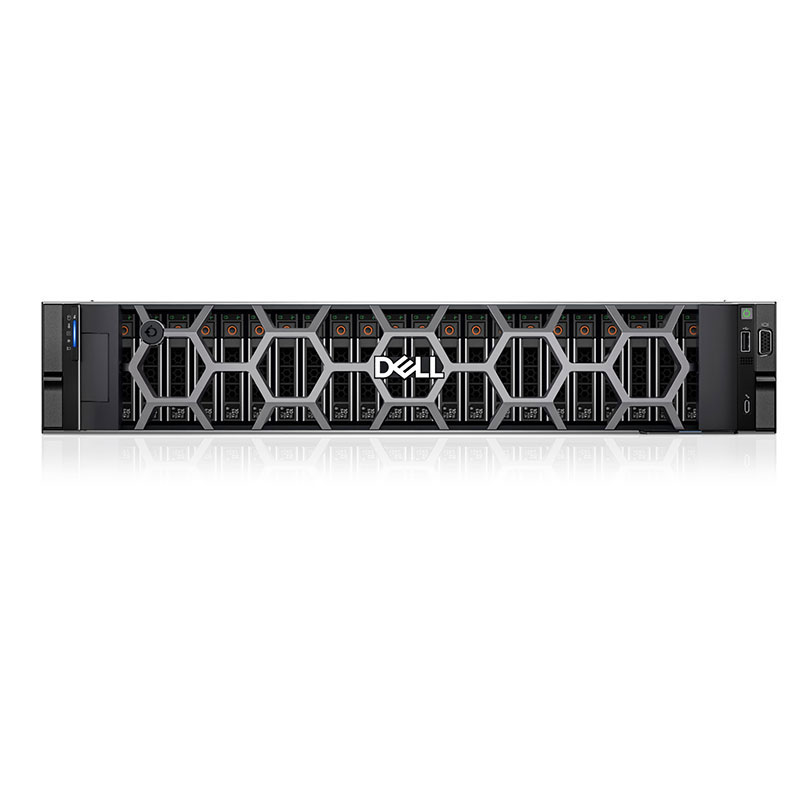
Tower servers resemble desktop PCs and are ideal for small offices or branch locations that lack dedicated racks. Rack servers mount into standardized 19‑inch racks, providing dense compute and storage capacity for data centers and IT rooms. Modular platforms like the MX series use shared chassis and sleds to pool compute, storage, and networking for highly scalable environments. Specialty models, including rugged edge and hyper‑scale platforms, are designed for harsh conditions, large cloud farms, and AI or HPC workloads.
What Are the Main Dell PowerEdge Tower Server Models and Their Ideal Use Cases?
Tower PowerEdge models are designed for quiet operation, easy deployment, and office-friendly environments where dedicated server rooms are not available. They typically offer strong expandability, allowing businesses to add storage, memory, and GPUs over time without complex infrastructure.
Key modern tower models include the T160, T360, T550, and T560. The T160 targets small businesses that need a reliable entry-level server for file sharing, light databases, and basic business applications. The T360, with support for Intel Xeon E-2400 processors, is ideal for growing offices that require more cores and memory for virtualization, collaboration tools, and line-of-business applications. The T550, featuring 3rd Gen Intel Xeon scalable processors, serves mid-sized enterprises that need robust performance and expansion for virtualization clusters or private cloud. The T560, equipped with 4th Gen Intel Xeon scalable CPUs, is suitable for demanding workloads such as advanced analytics, heavy databases, or GPU-accelerated tasks in an office setting. WECENT frequently recommends these towers to organizations that need scalability without investing in full rack infrastructure.
Which Dell PowerEdge Rack Server Models Are Common and What Features Do They Provide?
Rack servers in the PowerEdge family are the backbone of most modern data centers due to their high density and rich feature sets. They are available in various heights (measured in rack units, such as 1U or 2U) and support different socket counts, storage options, and GPU configurations. This allows IT teams to design flexible architectures for everything from web hosting to large virtualization clusters.
Representative rack models include the R260 as an entry-level 1U platform, the R650 and R660 in the dense compute segment, and the R750 and R760 as flagship 2U workhorses. The R260 is suitable for small business services, edge deployments, or lightweight virtualization. The R650 and R660 focus on maximizing compute per rack unit, making them excellent for dense virtualization, microservices, and cloud-native workloads. The R750 and R760 offer more PCIe slots, greater memory capacity, and higher storage density, making them ideal for database servers, large virtualization clusters, AI inferencing, and mixed enterprise workloads. WECENT often deploys these rack systems in multi-node clusters where scalability, redundancy, and energy efficiency are critical.
What Are the Key Differences Among Popular Rack and Tower Models?
To help compare common PowerEdge tower and rack platforms, the table below summarizes typical use cases and strengths.
WECENT uses this type of classification when advising customers, ensuring each deployment balances cost, density, and performance.
How Do Dell Modular Infrastructure and Blade-Style PowerEdge Servers Enhance Scalability?
Modular PowerEdge systems are built to consolidate compute, storage, and networking into shared enclosures, simplifying growth and lifecycle management. Instead of deploying individual servers with separate power and networking, organizations can install chassis that host multiple compute sleds and storage modules, providing pooled resources.
The PowerEdge MX series, such as the MX7000 chassis with MX760c and MX860c compute sleds, delivers flexible, composable infrastructure for large virtualization clusters, private clouds, and software-defined data centers. These platforms simplify cabling, centralize management, and enable dynamic allocation of resources to match workload demands. In addition, PowerEdge C-series platforms and high-density designs are well suited to hyper-scale and HPC environments where maximum compute per rack, streamlined serviceability, and energy efficiency are priorities. WECENT often recommends modular infrastructure to enterprises planning long-term data center growth or multi-node AI and analytics environments.
What Specialty Dell PowerEdge Servers Are Available for Edge and Hyper-Scale Computing?
Specialty PowerEdge servers are designed for environments that go beyond traditional, climate-controlled data centers. They address edge computing, telecom, industrial, and hyper-scale deployments where space, power, and environmental conditions can be highly constrained. These systems emphasize durability, temperature tolerance, and high efficiency.
The XR series offers ruggedized servers capable of operating in harsh edge locations, with models such as the XR4520c and XR7620 engineered for telecom, 5G, and industrial sites. These servers often support short-depth racks, dust and shock resistance, and wide temperature ranges. The HS series is optimized for large-scale data centers and cloud providers, focusing on high node density, streamlined serviceability, and energy savings, making them ideal for hyperscalers running massive web, storage, or cloud-native platforms. WECENT leverages these specialty lines for customers implementing edge AI, IoT analytics, and large, multi-region cloud deployments.
How Can One Decode Dell PowerEdge Server Naming Conventions?
Understanding the PowerEdge naming convention helps quickly identify server capabilities. Each model name combines a letter and three digits that convey its form factor, socket class, generation, and processor manufacturer. This allows IT teams to make fast decisions and compare platforms across generations.
The leading letter indicates the form factor or class: R for rack, T for tower, and MX or M for modular infrastructure. The first digit typically relates to the socket or class tier (for example, lower numbers often align with entry or single-socket classes, while higher numbers can represent larger or more capable platforms). The second digit indicates the generation; for instance, a “6” corresponds to the 16th generation. The third digit indicates the processor type, with 0 commonly used for Intel-based systems and 5 for AMD-based systems. For example, an R760 is a rack server, in the 16th generation, using Intel processors, while an R7625 would represent an AMD-based variant in the same generation and class.
How Have Dell PowerEdge Generations Improved Over Time?
Each new PowerEdge generation introduces architectural and platform improvements that enhance performance, efficiency, and manageability. Advances typically center on newer CPU families, faster memory, improved PCIe bandwidth, expanded storage options, and modern GPU support for AI and HPC workloads.
Fourteenth-generation PowerEdge servers adopted Intel Broadwell and Skylake-era processors and introduced stronger systems management and security features. The fifteenth and sixteenth generations expanded support for Intel Cascade Lake and newer AMD EPYC families, adding more cores per socket, higher memory speed and capacity, and broader use of NVMe storage. Modern 16th-generation systems are designed with AI acceleration, PCIe Gen4/Gen5 support, and higher-density GPUs in mind, enabling more powerful virtualization, analytics, and machine learning clusters. WECENT assesses generation differences when planning upgrades, ensuring customers benefit from improved performance-per-watt and future-proof architectures.
What Role Do iDRAC and OpenManage Play in Dell PowerEdge Environments?
iDRAC (Integrated Dell Remote Access Controller) and OpenManage form the backbone of PowerEdge management and monitoring. They allow IT administrators to control servers remotely, automate routine tasks, and maintain consistent configurations across large fleets of systems.
iDRAC provides out-of-band access for tasks such as power control, hardware health checks, firmware updates, and remote console access—even when the operating system is down. OpenManage adds centralized lifecycle management, enabling admins to monitor multiple servers, push firmware updates, apply configuration templates, and integrate with automation and orchestration tools. Together, these capabilities reduce downtime, streamline maintenance, and improve security compliance. WECENT incorporates these tools into deployment plans, particularly for organizations with distributed sites or large data centers.
How Do Dell PowerEdge Models Differ in Scalability and Workload Focus?
Scalability in PowerEdge servers is mainly determined by chassis size, socket count, PCIe slot availability, and memory capacity. Single-socket 1U systems serve as efficient platforms for lightweight workloads or edge deployments, while dual-socket 1U and 2U systems provide the balance and density required for enterprise virtualization, databases, and application clusters.
High-end 3U and 4U platforms, as well as modular and specialty servers, support larger memory footprints, more PCIe slots, and multiple GPUs, enabling AI training, large in-memory databases, and high-performance computing. Storage-rich variants such as “xd” models deliver extra drive bays for data-heavy workloads like software-defined storage, backup, and big data analytics. WECENT’s consulting approach focuses on mapping these scalability characteristics to each customer’s growth plans, ensuring that the selected platform has headroom for future expansion.
What Are the Main Workload Matches Across PowerEdge Classes?
The table below highlights example workload matches for different PowerEdge categories, helping businesses quickly narrow down choices.
WECENT uses similar workload mapping when designing multi-tier environments that combine edge, core, and cloud infrastructure.
How Can Businesses Choose Between Dell Tower and Rack PowerEdge Servers?
The decision between tower and rack servers depends primarily on physical space, noise tolerance, growth plans, and IT maturity. Towers are usually best for organizations without dedicated server rooms, while racks shine in environments expecting rapid expansion or centralized management.
Businesses that operate from small offices or retail locations often prefer tower servers like the T160, T360, T550, or T560 because they are quieter, simpler to deploy, and do not require racks or advanced cooling. In contrast, organizations with data centers, IT closets, or co-location space favor rack servers that maximize compute and storage density, such as the R650, R660, R750, or R760 families. These platforms integrate more easily into structured cabling, centralized power, and advanced cooling systems. WECENT typically recommends starting with towers for early-stage setups and transitioning to racks as consolidation, virtualization, and central management become priorities.
Where Can Businesses Find Reliable Information on Dell PowerEdge Generations and Models?
Accurate information on PowerEdge generations, model capabilities, and lifecycle status is essential for planning upgrades and maintaining support coverage. Most organizations rely on official documentation, service tags, and trusted integration partners to gather this information.
By checking the model name and service tag, IT teams can look up hardware details such as processor generation, memory limits, firmware updates, and support timelines. Generation references like 14G, 15G, 16G, and 17G help identify compatible components and performance characteristics. Partners such as WECENT maintain deep knowledge of multi-generation PowerEdge fleets and can cross-reference existing deployments with newer models, ensuring smooth transitions, compatibility with storage and networking, and efficient use of budgets.
Why Should Enterprises Work with WECENT for Dell PowerEdge Deployments?
Enterprises benefit from working with experienced partners who understand both hardware capabilities and real-world deployment challenges. WECENT combines expertise in servers, storage, networking, and GPUs with hands-on experience in sectors such as finance, education, healthcare, and data centers.
As an authorized supplier of Dell, Huawei, HP, Lenovo, Cisco, and H3C, WECENT delivers original, certified hardware and helps organizations design end-to-end infrastructures that support virtualization, cloud computing, big data, and AI workloads. The team provides consulting, product selection, installation, maintenance, and long-term technical support, ensuring each deployment is reliable, secure, and scalable. For wholesalers, system integrators, and brand owners, WECENT can also assist with OEM customization, enabling differentiated solutions in competitive markets.
What Are WECENT Expert Views on Choosing the Right PowerEdge Server?
WECENT Expert Views“Selecting the right Dell PowerEdge platform starts with understanding workloads, growth expectations, and deployment environments. Tower servers fit quiet office spaces, while rack and modular platforms excel in dense data centers and AI clusters. By aligning server form factor, generation, and scalability with real business needs, WECENT helps customers balance performance, cost, and long-term flexibility.”
What Are the Key Takeaways and Next Steps for Businesses Evaluating Dell PowerEdge Servers?
Dell PowerEdge servers provide a broad portfolio covering edge sites, small offices, enterprise data centers, and hyper-scale environments. By understanding form factors, model naming conventions, and generation improvements, businesses can match servers precisely to workload demands and growth strategies.
Actionable next steps include inventorying current workloads, defining performance and capacity targets, and mapping these needs to appropriate towers, racks, modular, or specialty systems. Organizations should also consider management tools like iDRAC and OpenManage, as well as GPU and storage requirements for AI, analytics, and virtualization. Working with a specialist such as WECENT ensures that server selections, configurations, and deployment plans are aligned with budget, lifecycle, and digital transformation goals, enabling a stable yet flexible IT foundation.
FAQs
What is the difference between Dell tower and rack PowerEdge servers?Tower servers resemble desktop PCs, run quietly, and are ideal for offices without racks, making them perfect for small businesses and branch locations. Rack servers mount in standard racks, provide higher density, and are designed for data centers or IT rooms where scalability, centralized management, and efficient cooling are priorities.
Which Dell PowerEdge models are best for virtualization?For virtualization, dual-socket rack servers such as the R650, R660, R750, and R760 families are strong choices because they offer large memory capacity, multiple PCIe slots, and options for high-core-count CPUs. These characteristics support high VM density, robust performance, and flexible scaling for private cloud or VDI deployments.
How do I choose the right PowerEdge generation for my business?Choosing a generation depends on performance needs, budget, and support lifecycle. Newer generations, such as 16G and above, offer better CPU efficiency, faster memory, PCIe Gen4/Gen5, and improved GPU support. Organizations planning long-term deployments or AI and analytics projects should prioritize recent generations that deliver stronger performance-per-watt and longer support horizons.
Can Dell PowerEdge servers support AI and GPU workloads?Yes, many PowerEdge models, especially rack and specialty lines like the R760xa and XE-series, support multiple NVIDIA GPUs for AI training, inferencing, and high-performance computing. These servers are designed with adequate power, cooling, and PCIe bandwidth to handle modern accelerators used in machine learning, data science, and visual computing.
Why should I partner with WECENT for Dell PowerEdge solutions?Partnering with WECENT provides access to certified hardware, experienced solution architects, and end-to-end services from design and sizing to deployment and support. This ensures that PowerEdge servers are configured correctly, integrated smoothly with storage and networking, and optimized for your specific workloads and growth plans.